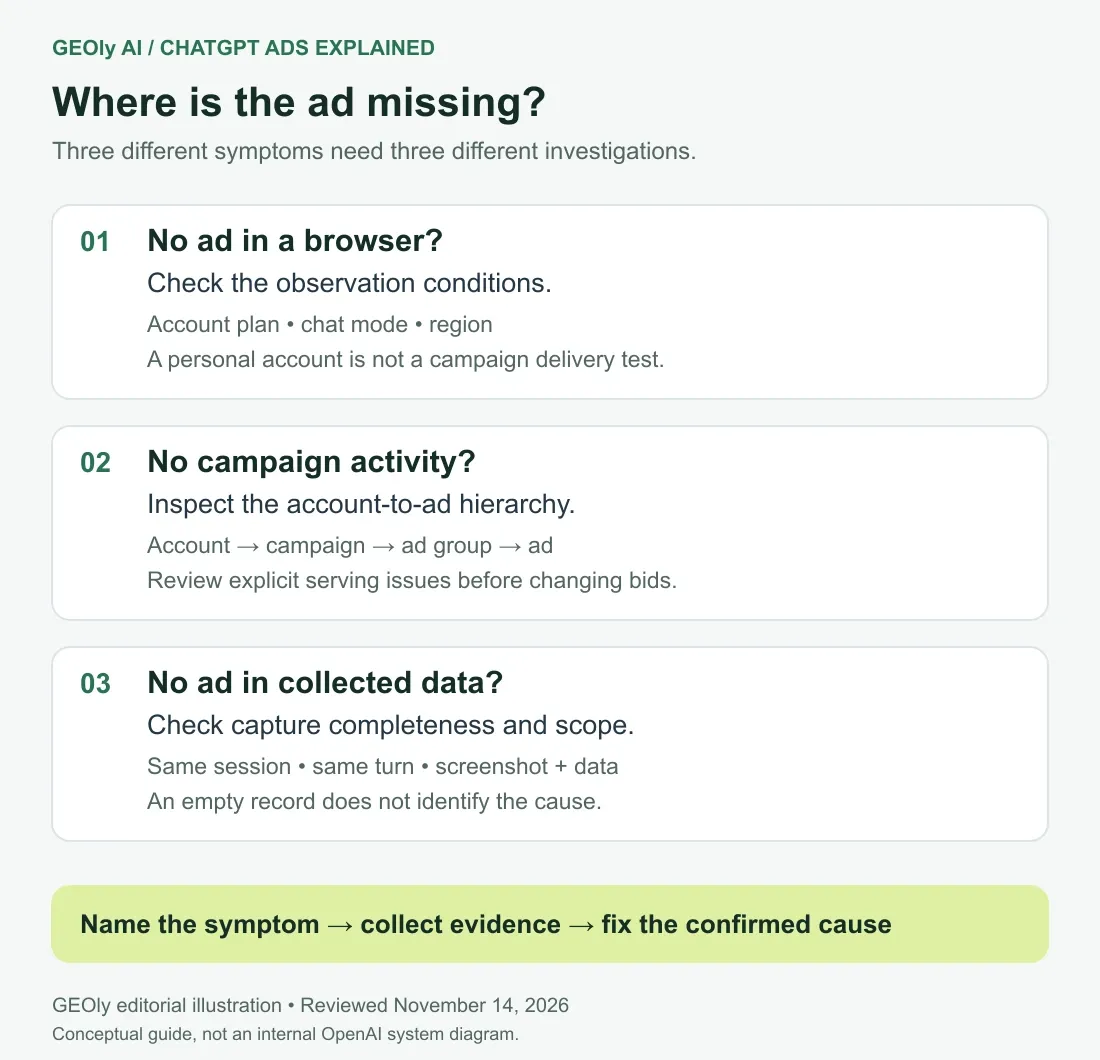
When ChatGPT ads are not showing, start by defining where the absence was observed. An employee's browser, an advertiser report and a third-party capture describe different things. Troubleshooting works better when the question names the account, surface, time range and expected outcome.
This GEOly AI diagnostic guide was reviewed on November 14, 2026. It extends our explanation of how ChatGPT ads work. The investigation workflow below is our recommendation; it is not OpenAI's internal status model.
Key Takeaways
- A browser observation and an advertiser delivery report need different checks.
- Investigate explicit serving issues before changing spending settings.
- Preserve failed captures separately from valid observations without an ad.
- Compare evidence from the same session and turn when investigating a missed capture.
First, name the symptom
Symptom | First evidence to collect | Premature conclusion to avoid |
|---|---|---|
A colleague sees no ad | Plan, chat mode, region and observation time | The campaign is broken |
Our campaign has no reported activity | Account and resource status, selected date range | The creative is necessarily bad |
A capture returns an empty ad list | Capture completeness, errors and visible view | The platform has no advertising |
A competitor disappears from a sample | Sampling method and comparable prior observations | The competitor stopped spending |
Write a one-sentence incident statement: “Our campaign report shows no impressions for this campaign over this interval,” or “This capture contains no ad record.” Do not merge these into “ChatGPT ads are down.” The narrower wording makes the next action clearer.
Check whether the observation is an eligible test
The ChatGPT ads FAQ excludes Temporary Chats and ad-free plans, and describes regional rollout and user controls. It also recognizes logged-out advertising experiences. Consequently, neither “no login means no ads” nor “Free means an ad on every turn” is a reliable test assumption.
Record the conditions available to you without collecting private conversation history. Use a neutral product-research scenario and preserve the actual question. If you change account, region, device and question at once, a different result will not isolate which change mattered.
Do not ask colleagues to share personal chats to prove a campaign works. A dedicated, authorized test environment and a written observation protocol make evidence easier to compare.
Inspect your campaign from the top down
OpenAI's troubleshooting documentation recommends checking explicit serving issues and the full account-to-ad hierarchy. An active ad can still be blocked by its parent campaign, account reviews or spending constraints. Empty serving-issue results do not guarantee impressions.
GEOly recommends a compact investigation log: resource ID, visible issue, owner, action and next verification. Fix one confirmed blocker, save the change time and inspect again. This prevents a broad “reset everything” response from destroying the evidence needed to understand the problem.
If an operator reports that the creative is approved, ask whether the campaign and ad group are active too. If the campaign has budget, verify that the account has capacity to spend. If the landing page loads on your laptop, check the exact destination configured in the ad, including redirects and regional availability.
Only then consider whether targeting is too restrictive or the offer is poorly expressed. Our context-hints guide provides a separate review for that problem.
A complete answer can coexist with no visible ad
OpenAI's engineering explanation treats no-ad outcomes as normal and describes timing limits around placement. It also uses delivery terminology at different points in the lifecycle. Do not treat an undocumented third-party “delivered” label as a standardized impression event.
The practical response is to preserve uncertainty. If your capture does not show why an ad is absent, record the cause as unknown. A guessed reason such as inventory shortage or blocking is less useful than an honest observation that can later be reconciled.
Distinguish a capture problem from an advertising outcome
Build a small evidence packet for each disputed observation. Include the collection timestamp and timezone, platform surface, full question sequence relevant to the observation, capture status, screenshot scope and the data fields returned. Redact personal information before circulating the packet.
The strongest mismatch is a visible sponsored placement in the same session and turn with no corresponding record in that capture's output. Even then, investigate where the mismatch occurred: collection, transfer, parsing or report aggregation. An ad seen yesterday in another account is not an equivalent control.
Use served-versus-rendered measurement to define the states your system can genuinely observe. Keep missing or failed data out of a denominator presented as completed observations.
When should a team escalate?
Escalate a campaign problem with its resource identifiers, reporting interval, visible serving issues and recent changes. Escalate a collection problem with a reproducible capture mismatch. The recipient should be able to tell what happened without reconstructing the whole investigation from chat messages.
For a working campaign with uneven results, use a planned evaluation interval and sufficient evidence for the decision. Set this before reading outcomes. A handful of manual checks is useful for finding interface problems, but weak evidence for estimating market-wide reach.
The existing ad intelligence vs ROI guide explains why observed competitors and your own campaign economics require separate data.
Frequently asked questions
Should I keep refreshing until an ad appears?
Repeated checks can demonstrate that an ad appeared somewhere in the test, but they do not establish a representative rate. Save the full test method and avoid selectively reporting only successful observations.
Does zero captured ads mean zero campaign impressions?
No. Your capture sample and the platform's campaign report have different scope. Reconcile each against its own definitions.
Should I increase the budget to fix missing ads?
Only after identifying budget as a relevant constraint. Start with the explicit issue and measurement checks above.
Written by the GEOly AI editorial team. Continue through the ChatGPT Ads collection or return to the series overview.