提示词
管理监控 Prompt,查看 AI 回答、可见性、竞品共现、引用来源和 AI 实际检索词(非用户搜索日志)。
提示词(Prompts)操作手册
入口与用途
登录 GEOly 后,从左侧导航进入 监控 → Prompts。这里管理品牌要持续观察的自然语言问题,并查看这些问题在 AI 回答中的品牌可见性、竞品共现、提及份额、引用来源和原始回答。
提示词不是单个 SEO 关键词,而是目标客户可能直接问 AI 的完整问题。下面直接以已选择的 DJI(大疆)品牌为例。截图中的列表里可以看到这条示例 Prompt:
What are the best thermal camera drones for solar panel inspections?
这是一条不带品牌名的类别型 Prompt,用来观察 DJI 在“太阳能板巡检热成像无人机”问题中的可见度。若要进一步测试品牌定位,可以再创建一条品牌型 Prompt:
Which DJI drone is best for solar panel inspections, and what evidence supports the recommendation?
一次完整的 Prompt 工作流是:创建问题 → 等待系统自动完成监测 → 固定范围查看列表 → 打开详情 → 阅读执行记录和引用 → 形成内容或定位动作 → 用相同条件复查。
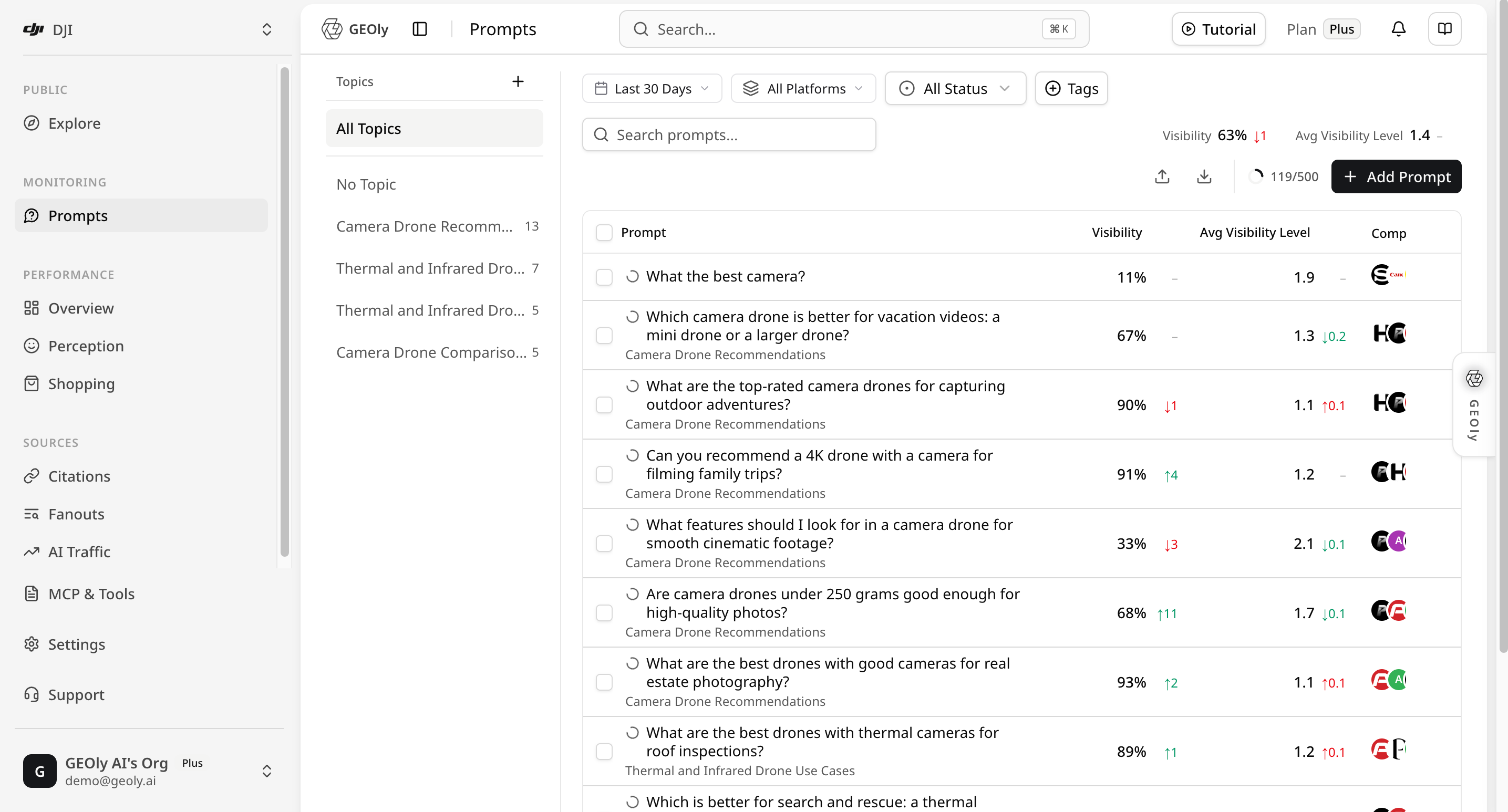
本手册的截图以 DJI 示例品牌和工作区为背景,仅用于说明界面与分析方法;指标会随账号、时间范围和平台变化,不代表读者账号的实际结果。
为什么要持续看 Prompt
客户通常想知道三件事:AI 会不会推荐我的品牌?竞品为什么会出现?AI 参考了哪些页面? 以 DJI 的太阳能板巡检 Prompt 为例:
- 没有提到 DJI:检查官网是否缺少太阳能板巡检场景、产品参数或适用对象;
- 提到 DJI,但没有引用官网:补充 AI 容易找到和引用的参数、案例页面;
- 竞品经常出现:查看 AI 用什么标准做推荐,再说明 DJI 和竞品的区别;
- 网站更新后:用同一条 Prompt 和同样的筛选条件再次查看。
这样,Prompt 就不只是一个问题,而是帮助团队找到内容问题、决定修改方向的入口。它不能直接证明流量、转化或收入,但能告诉团队下一步应该检查和优化什么。
不知道该问哪些问题?用 AI 建议先生成
在登录后的 Prompts 页面点击 添加提示词 → AI 建议。在“监控方向”中填写品牌、产品类别、目标人群或使用场景,也可以只输入几个关键词;留空时,系统会根据品牌资料生成建议。然后选择是否让 AI 建议主题,并确认国家/地区、语言以及每个主题生成的数量。页面会显示当前设置下的剩余额度。
点击 生成建议 后,GEOly 会先返回可供挑选的主题和 Prompt 草案。这个步骤不会自动保存或开始监测;请逐条检查问题是否属于你的业务、是否覆盖真实的购买或比较场景、国家/语言是否正确,并删除重复或不相关的问题。以 DJI 为例,可以输入“面向户外创作者和企业巡检的相机无人机”,再从候选结果中保留类似 What are the best thermal camera drones for solar panel inspections? 的具体问题。确认并保存后,选中的问题才会加入 Prompts 监控。
AI 生成的内容是 Prompt 设计辅助,不是实时用户提问日志、搜索量统计、传统搜索排名或结果保证。生成数量、剩余额度和可用选项以当前账号、国家/地区、语言、套餐和页面显示为准;保存后仍需等待监测执行完成,才能在列表和详情中读取 Visibility、提及、引用等结果。界面和规则会随产品版本更新,操作时以 Prompts 页面当前可见选项为准。
按团队需要选择套餐
| 你的情况 | 可以从哪里开始 | 什么时候考虑升级 |
|---|---|---|
| 只有一个品牌,先看看 AI 是否会推荐 | Basic | 需要监测更多平台或让多人一起使用 |
| 想看更多平台,或需要团队协作 | Grow | 需要更长时间的数据或更多自动化能力 |
| 要在多个平台上持续优化 | Advanced | 需要 GEO Agent、更多数据和更长的观察时间 |
| 代理商或管理多个品牌 | Plus | 需要多品牌、全部平台和 API |
如果只是想先看一次结果,可以从试用或 Basic 开始。如果要长期追踪很多问题、保存引用证据,并让团队根据结果持续修改内容,再按品牌数、平台数和协作人数升级。具体额度和权益以当前定价页及账户页面为准。
GEOly 能帮你做什么
GEOly 把“想问什么、AI 怎么回答、AI 引用了什么”放在同一个地方:
- 帮你根据监控方向、品牌资料或关键词生成候选问题;
- 按品牌、主题、国家/地区、平台和时间查看结果;
- 直接阅读 AI 原文、竞品出现情况和引用链接;
- 把结果导出,交给内容或市场团队继续处理。
所以,GEOly 不只是告诉你“今天有没有被提到”,还让你知道为什么会这样、下一步改哪里、改完后有没有变化。不同套餐提供的平台、Agent、报告和 API 不同,具体以账户和定价页为准。
核心:如何判断 Prompt 质量
GEOly 不会用一个单独的“Prompt 质量分数”替代人工判断。Prompt 质量指的是:这个问题是否足够接近真实客户提问,能否稳定地观察一个明确的 AI 决策场景,并能在回答和引用中找到可执行证据。它和 DJI 当前的 Visibility 高低不是同一个概念;一个质量很高的问题也可能得到较低可见度。
Prompt 质量检查表
| 检查维度 | 高质量标准 | DJI 示例 | 常见问题 |
|---|---|---|---|
| 客户意图 | 像真实购买、比较或使用问题 | What are the best thermal camera drones for solar panel inspections? | 只写 drone 或 DJI |
| 单一目的 | 一条 Prompt 只回答一个决策问题 | 只问“太阳能板巡检用什么热成像无人机” | 同时混入价格、售后、旅行拍摄等无关目的 |
| 场景具体 | 写清使用对象、任务或环境 | solar panel inspections | “适合所有行业”“性能最好”但没有场景 |
| 决策标准 | 使用 best、compare、under $X、for beginners 等可解释标准 | best + 巡检场景 | 形容词堆叠,无法判断为什么被推荐 |
| 可复查性 | 国家/地区、平台和时间条件可以固定 | US + All Platforms + Last 30 Days | 每次改写问题或混用国家,导致前后不可比 |
| 可行动性 | 回答和 Citation 能对应到产品页、参数或案例证据 | 检查 DJI 是否被提及、排位和引用 URL | 只追求“出现品牌”,不准备验证证据 |
用 DJI 建立不同类型的 Prompt
不要把所有问题都写成带品牌名的 Prompt。建议把同一产品市场拆成不同意图:
- 类别发现型:
What are the best thermal camera drones for solar panel inspections?——观察客户不点名品牌时,DJI 是否进入候选答案。 - 品牌能力型:
Which DJI drone is best for solar panel inspections, and what evidence supports the recommendation?——观察 AI 如何描述 DJI,以及是否给出可核实依据。 - 对比替代型:
How does DJI compare with other thermal camera drones for solar panel inspections?——观察回答中的选择标准、竞品共现和差异。 - 具体用例型:围绕飞行时间、热成像参数、户外环境或合规要求分别提问;每条只保留一个主要限制条件。
使用 Prompt 的正确方式
- 先建立一组意图平衡的问题,再看整体分布;不要用单条 Prompt 代表 DJI 的全部 AI 可见度。
- 创建后先固定国家/地区、平台和时间窗口;不要把“足够”理解成一个固定数字,至少先确认存在已完成 Records,再结合记录规模阅读原始回答和引用。
- 内容优化后尽量保留原 Prompt 文本,只改变网站内容并记录上线日期。若必须改写 Prompt,要标记为新版本,否则前后结果不再是同一问题的可比趋势。
- 不要为了让 DJI 更容易出现而把品牌名强行加入所有类别型问题;这会改变要测量的客户意图。
- 质量判断看“问题是否有效、范围是否可复查、证据是否可用”,不要把 Visibility、Mention Rank 或 Citation Rate 直接当作 Prompt 质量分。
先理解 Prompt 能解决什么问题
Prompt 监测回答的是“当客户这样问 AI 时,品牌会不会被看见、如何被描述、依据了哪些来源”。它适合持续观察以下场景:
- 类别发现:客户还不知道买哪个产品,只描述需求或问题。
- 最佳选择:客户使用“最好的、推荐、适合我”等决策词。
- 对比和替代:客户比较两个方案,或寻找某个竞品的替代品。
- 具体用例:客户带有行业、规模、地区、预算或团队角色限制。
- 品牌问题:客户直接询问品牌能力、定价、集成、可靠性或适用对象。
建议的 Prompt 组合
主推功能不只是添加一条问题,而是建立可复查的问题集合。一个基础集合可以包括:
- 3–5 条类别发现问题;
- 3–5 条最佳选择或榜单问题;
- 3–5 条对比、替代问题;
- 3–5 条核心用例问题;
- 2–3 条直接询问品牌能力的问题。
每条 Prompt 只表达一个清晰意图,并用 Topic 和 Tags 标出意图、市场、行业或项目批次。
使用前先确认
- 当前工作区和品牌正确。不同品牌的数据不能混在一起解读。
- 问题来自真实的购买、比较、使用或信息场景,而不是只写一个宽泛词。
- 创建时选择正确的国家/地区。AI 平台会从该地区视角进行搜索;后续比较时保持一致。
- 先决定观察窗口。列表工具行默认显示最近 30 天;可在工具行切换时间范围和平台。
以 DJI 为例:一次完整操作流程
- 在左上角品牌选择器中选择 DJI,先确认当前品牌、工作区和套餐。不要在品牌切换后继续沿用上一个品牌的结论。
- 进入 监控 → Prompts,将列表条件设为需要观察的国家/地区、时间范围、平台和状态。第一次复盘可以从 Last 30 Days、All Platforms、All Status 开始,再根据问题缩小范围。
- 点击 添加提示词,输入截图中的类别型 Prompt:
What are the best thermal camera drones for solar panel inspections?;选择对应国家/地区,可用 Topic 和 Tags 标记“太阳能板巡检/热成像”。 - 点击 保存提示词。这一步只代表 Prompt 已创建并产生待执行监测,不代表已经有完成记录;等待任务完成后回到列表刷新。
- 在列表中确认 Prompt 文本、国家/地区、状态和 Records 数。右上角类似
71/500的数字表示已使用 Prompt 数/套餐 Prompt 上限,不是 Responses 数、完成记录数或可见度分数。 - 点击该行或更多菜单中的 查看,先核对详情顶部的国家/地区、时间范围和平台;再依次阅读 Visibility、Executions、Citations 和 AI 实际检索词。
- 打开至少一条原始回答,记录品牌是否被提及、Mention Rank、Visibility Level、情绪和实际 Citation URL。没有记录、进行中或失败记录都先标为数据缺口。
- 形成“观察—证据—动作—复查条件”,内容上线并积累新记录后,用相同 Prompt、国家/地区、平台和时间窗口复查。
创建或导入提示词
单条创建
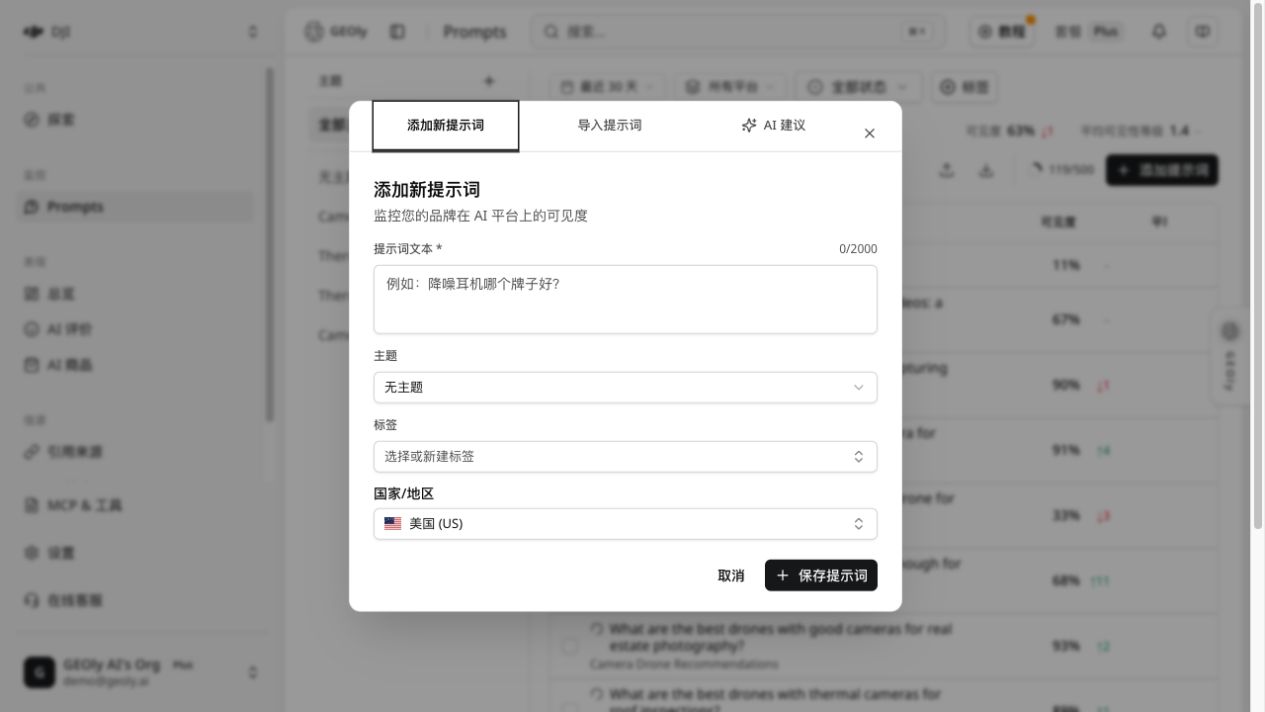
在 Prompts 页点击 添加提示词,填写:
- 提示词文本:必填,最多 2,000 个字符。尽量包含产品类别、目标人群、使用场景和决策意图。
- 主题:可选。用于把相近问题分组,之后可从左侧主题栏进入筛选或主题详情。
- 标签:可选。可选择已有标签,也可以在输入时创建新标签;标签适合表示场景、意图、市场或项目批次。
- 国家/地区:观察范围,默认是
US;可以搜索并选择其他国家/地区。
点击 保存提示词 后,系统会自动为新提示词触发待执行的监测。保存成功不等于已经有完成记录,请回到列表确认记录数。
批量导入
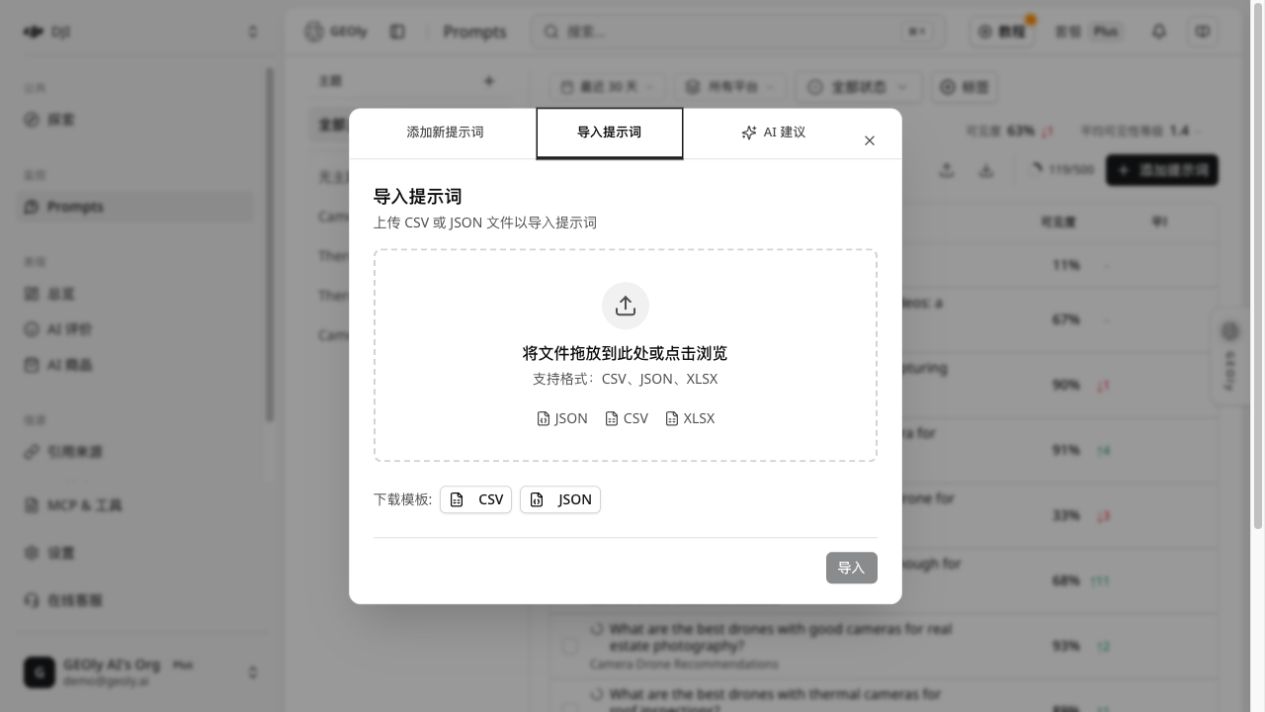
点击工具行的上传图标,在添加窗口切换到 导入提示词。支持 CSV、JSON、XLSX。文件至少要有 text 或 prompt 列;常用可选列包括 topic、topic_id、tags 和 country。CSV 的多个标签用逗号分隔,JSON 应为对象数组。导入时,文件中的主题名称会与已有主题匹配;找不到的主题会自动创建。
导入前先检查预览和组织共享的提示词配额。导入成功后,系统会自动触发本品牌待执行的监测。
导入文件示例
CSV 的最小格式如下:
text,topic,tags,country
What are the best thermal camera drones for solar panel inspections?,Use Case,solar inspection;thermal camera,US
What are the best camera drones for high-quality travel videos?,Comparison,travel video;camera quality,US
JSON 使用对象数组,每个对象至少包含 text 或 prompt:
[
  {"text":"What are the best thermal camera drones for solar panel inspections?","topic":"Use Case","tags":["solar inspection","thermal camera"],"country":"US"}
]
导入前先用预览检查:必填文本是否为空、国家码是否正确、Topic 是否被正确匹配、标签是否被拆分,以及预计消耗的组织配额。不要把客户个人信息、密码、API 密钥或其他敏感资料放入 Prompt 文件。
套餐、配额与数据边界
下面的数字是当前定价页展示的默认额度;价格、可用平台、组织覆盖配置和附加权益可能调整,实际使用时以当前定价页和账户页面为准。
| 套餐 | Prompt 总数 | AI 平台 | Responses/月 | AI Credits/月 | MCP Credits/月 |
|---|---|---|---|---|---|
| Basic | 30 | 1(ChatGPT) | 900 | 3,000 | 不含公开行业额度 |
| Grow | 50 | 2(ChatGPT、Google AI Mode) | 3,000 | 10,000 | 25,000 |
| Advanced | 100 | 4(ChatGPT、Gemini、Perplexity、Google AI Mode) | 12,000 | 30,000 | 75,000 |
| Plus | 500 | 全部 6 个 | 90,000 | 100,000 | 200,000 |
| Enterprise | 自定义 | 自定义 | 自定义 | 自定义 | 自定义 |
请按以下边界解读这些额度:
- Prompt 总数是组织级监测 Prompt 配额,不是每个品牌、每个平台各有一份;导入前应先确认组织剩余配额。
- Responses/月是监测回答容量,不是保证拿到的完成记录数。平台不可用、任务失败、仍在进行或筛选范围过窄,都可能让实际 Records 少于额度。
- AI Credits 是产品内 AI/Agent 推理或生成能力使用的独立额度池,与 Responses、Prompt 执行次数不同;MCP Credits 是 MCP、CLI 及后续 API 公开行业情报调用的独立组织共享额度。读取自有监测数据通常不消耗 MCP Credits,付费的公开行业分析才会扣减;两者都不能直接换算成可执行 Prompt 数,具体消耗和重置以账户页、用量回执为准。
- MCP Credits 当前为:Basic 不含公开行业额度、Grow 25,000、Advanced 75,000、Plus 200,000、Enterprise 按方案定制;额度由组织共享,未用额度不自动结转。AI Credits 是独立额度池,用于产品内 AI/Agent 推理或生成能力,具体有效期、消耗和结算以账户页面与调用回执为准。
- 情绪分析、Shopping 商品卡、Agent、报告等附加能力有各自的套餐开关或额度,不能从 Prompt 总数或 Responses/月自行推断;需要按套餐对比表和当前账户状态确认。
- 详情页的 Last 30 Days 或自定义日期不能突破账号实际可用历史。AI 实际检索词在有数据时可能展示近 90 天,但仍以当前账号实际保留和可用的数据为准。公开行业洞察的 90 天窗口需要 Advanced 及以上;不要把定价页中的 365 天说明扩展到所有模块。
- All Platforms 表示当前工作区和套餐允许的平台,不代表系统中所有 AI 平台;不同套餐看到的平台选择器可能不同。
- 列表、详情、引用和导出都只覆盖当前品牌、Prompt、国家/地区、平台、时间范围和可用完成记录;不包含用户真实搜索日志、全市场份额或未返回的 AI 回答。
- 截图中的
71/500只能解读为 Prompt 配额使用情况;套餐升级、品牌切换或平台权限变化后,分母可能不同,不能拿它估算监测覆盖率。
因此,报告中应同时写明套餐、筛选条件、数据保留窗口和完成 Records 数;不要把“配额上限”“已完成记录数”和“AI Credits 余额”写成同一个指标。
主题栏、筛选与搜索
页面采用左右工作区布局:桌面端左侧是主题栏,右侧是列表;窄屏时主题栏会变成横向 chips。
- 主题栏:可查看全部主题、无主题和已创建主题。自建主题支持新增、重命名、删除和打开主题详情;删除主题不会删除提示词,已分配提示词会变为未分类。
- 时间范围与平台:工具行第一排的全局筛选。比较前后结果时,保持时间范围和平台组成不变。
- 状态:可选全部、活跃、未激活。停用提示词不会删除历史执行记录。
- 标签:可按一个或多个标签筛选,也可打开标签管理器重命名或删除标签。
- 搜索:在第二排输入提示词文本,搜索会延迟约 700 ms 后更新结果。
- 清除:有搜索、状态或标签筛选时,可清除这些工具行筛选;主题筛选由左侧主题栏单独控制。
筛选和排序在服务端分页执行。列表支持每页 10、25、50 或 100 条;不要把当前页看到的数量当成全部结果。
列表怎么读
列表行可点击打开 Prompt 详情。当前列包括:
| 列 | 解释 | 使用建议 |
|---|---|---|
| 提示词 | 两行截断显示完整问题,过长时悬停查看全文;副行按需要显示国家码和主题 | 先确认问题本身属于目标场景 |
| 可见度 | 当前筛选范围内的 AIGVR 可见性分数(百分比)及环比 | 只在相同范围内做比较 |
| 平均可见性等级 | 1、2、3 的平均值;1 为高、2 为中、3 为低,数值越小表示呈现层级越高 | 不是推荐名次,必须结合原始回答 |
| 竞品提及 | 与本品牌在同一批回答中共现的、已配置竞品头像堆 | 表示回答中的共现,不代表市场份额,也不代表系统自动发现了新竞品 |
| 份额 | SoM(提及份额)及环比 | 表示当前监测回答中的提及占比,不等于销售份额 |
| 引用率 | 当前范围内品牌来源记录的占比及环比 | 点击详情核对具体 URL 和来源类型 |
| 记录数 | 当前范围内的执行记录数量 | 先记录已完成 Records 数,再结合记录数量解读分数 |
| 状态 | 活跃或未激活 | 只影响后续监测,不抹去历史数据 |
列表上方的汇总条显示当前筛选结果集的可见度和平均可见性等级;这些值按全部筛选结果计算,不只是当前页。
表中的“环比”是把当前筛选条件下的结果,与前一个等长时间窗口的结果进行比较;切换时间范围或平台后,比较基准也会随之变化。
行内和批量操作
每行右侧的更多菜单提供 查看、编辑、激活/停用、删除。删除提示词前,系统会取消该提示词正在运行的监测任务;删除后无法在列表中恢复,执行前请确认选中对象。
勾选多行后可以批量 激活、停用、设置主题、设置或清除标签、删除。批量删除前会出现确认对话框。批量操作只作用于当前已选中的提示词。
工具行的上传图标用于导入,下载图标可导出当前列表中的提示词为 CSV 或 JSON。
Prompt 详情
点击整行或更多菜单中的 查看,右侧会打开详情抽屉。详情页顶部可以切换:
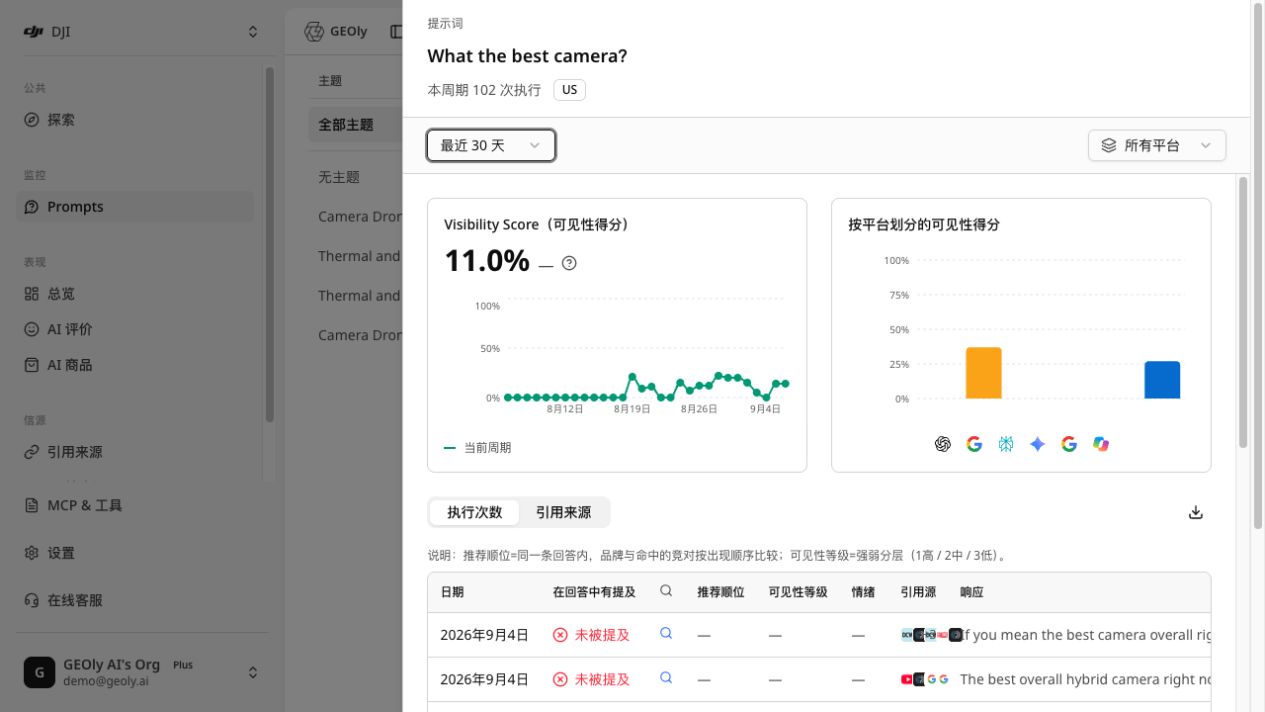
- 时间范围:最近 2 天、最近 7 天、最近 30 天或自定义日期;当前产品暂不显示更长的预设范围。
- 平台:全部平台或单个平台。
先看整体,再看平台
详情上方有两个图表:
- Visibility Score(可见性得分):当前范围的总体分数和按日趋势。
- 按平台划分的可见性得分:比较各 AI 平台差异。
分数和趋势只描述当前 Prompt、时间、国家/地区和平台范围内的监测结果。没有记录或记录很少时,不要把缺失当成品牌没有被提及。
推荐的阅读顺序
打开详情后,建议按以下顺序阅读:
- 先确认标题下的国家/地区、时间范围和平台筛选;
- 看总体 Visibility Score,再看各平台的差异;
- 在“执行次数”中打开至少一条原始回答,确认品牌是否真的被提及;
- 对被提及的回答检查 Mention Rank、Visibility Level、情绪和竞品共现;
- 切换到“引用来源”,判断 AI 参考的是品牌自有页面、第三方页面还是搜索结果;
- 最后查看 AI 实际检索词,寻找 AI 在回答过程中补充的概念和证据入口。
如果总体分数与单条回答感觉不一致,优先检查筛选范围、记录数量、平台差异和时间窗口,而不是立即判断指标错误。
执行次数
在 执行次数 标签中查看每次已完成或进行中的执行记录。表格可读到:日期、品牌是否被提及、联网搜索状态、推荐顺位、可见性等级、情绪、引用源、AI 回答和平台。点击一行会打开更深一层的执行详情。
执行详情可能包含:
- 原始回答及品牌、竞品高亮;
- 提及次数、推荐顺位和可见性等级的规则解释;
- AI 分析中的品牌态度、关键洞察、品牌叙事和竞对对比(若该记录已有分析结果);
- AI 触发的实时检索词和搜索来源;问题原文的复述改写会被剔除或折叠计数;
- Shopping 商品结果及商户报价(若本次回答返回购物数据)。
记录列表支持加载更多、收起,以及按日期、推荐顺位、可见性等级、情绪和来源等字段排序。切换筛选或排序后,页面会重新获取对应页的数据。
如何解读单次执行
- Mentioned 表示品牌是否在该次回答中出现;
Not Mentioned不代表品牌在所有回答中都没有出现。 - Mention Rank 是品牌与已配置竞品在同一回答中的出现顺序,不是全市场排名。
- Visibility Level 是回答中呈现强弱的等级:1 高、2 中、3 低;它与 Mention Rank 不是同一个概念。
- Sentiment 描述 AI 对品牌的表达倾向,应结合原文判断,不要只看颜色或标签。
- Sources 显示该回答关联的来源数量或来源入口,必须打开引用页核对具体 URL。
- Response 是判断 AI 叙事、产品定位和竞品差异的主要证据,不要只根据分数写结论。
记录可能处于进行中、已完成或没有可用回答的状态。进行中的记录先不要纳入最终结论;平台暂时没有返回数据时,应记录为数据缺口,而不是负面结果。
引用来源
在 引用来源 标签中查看当前 Prompt 范围内按 URL 去重后的来源页面。可查看:
- 排名、页面 URL、来源类型;
- 是否为品牌来源;
- 在当前范围中的占比和出现次数。
点击来源行可继续查看页面详情。来源类型用于区分正文引用、来源列表、附带链接和搜索来源;“品牌来源”是基于 URL、标题或描述中的品牌名/域名匹配,不代表系统抓取并验证了页面全部内容。
详情抽屉支持导出:AI 精简 JSON、完整 JSON、执行 CSV、引用源 CSV。导出内容只覆盖当前 Prompt 和当前筛选条件下可用的数据。
导出前先确认当前 Prompt、时间范围、国家/地区和平台筛选。导出的 CSV 适合做批量复盘;JSON 适合保留回答、分析和来源的结构化证据。导出文件仍可能包含品牌监测数据,应按组织的数据访问规则保存和共享。
AI 实际检索词
如果有可用数据,详情底部会出现 AI 实际检索词 区块,展示近 90 天 AI 回答该 Prompt 时实际发起的独立检索词、检索词覆盖的回答数量和在场品牌。与 Prompt 本身相同或只是复述的查询会被剔除并折叠为计数。它反映 AI 在回答过程中触发的检索行为,不是用户真实搜索量或关键词市场份额。
可把这些检索词按“产品定义、比较标准、场景限制、品牌证据”四类整理。它们适合帮助内容团队补充 FAQ、对比页、用例页和可引用事实,但不能当作用户级搜索日志或需求规模。
指标的计算和比较方法
在当前监测模型中,AIGVR 可见性由“是否被提及、出现位置、提及频次、是否有引用”共同影响。下面是帮助理解的简化表达,不是需要手工计算或导出的字段:
可见性 = 被提及门槛 ×(位置贡献 + 频次贡献 + 引用贡献)
因此,品牌被提及但没有来源引用,或只在回答末尾出现,分数可能仍然较低。列表中的环比只适用于筛选条件一致、且前后窗口长度相同的比较。记录量很小、平台组成变化或 Prompt 文本变化时,不应把分数变化解释成内容优化已经产生因果效果。
常见问题和排查
保存后为什么没有记录?
保存只创建 Prompt 并触发待执行任务。等待监测完成后,刷新列表并检查 Records;如果仍为空,确认 Prompt 处于活跃状态、国家/地区和组织配额正确。
为什么列表有记录,但详情图表没有数据?
先确认详情抽屉使用的时间范围和平台筛选与列表一致。详情只统计当前 Prompt、国家/地区、平台和时间范围内的可用完成记录;进行中或失败的任务不会贡献完整图表数据。
为什么竞品头像和我配置的竞品不一致?
竞品只根据组织中已配置的品牌名称和别名匹配。系统不会自动发现、验证或补充新的竞品;需要新增竞品时,应先在竞品管理功能中配置。
为什么引用率很高,但品牌可见度不高?
引用率和可见度是不同信号。AI 可能引用了品牌页面,但没有在回答正文中提及品牌,或品牌只在较弱的位置出现。应同时阅读原始回答和引用 URL。
为什么不同平台的结果差异很大?
平台的搜索、回答结构和引用策略不同。不要把一个平台的结果当成整体结论;使用平台筛选逐个平台阅读,并保持国家/地区和 Prompt 文本一致。
如何安全删除 Prompt?
删除前确认已导出需要保留的证据。系统会先取消正在运行的监测任务;删除后 Prompt 无法从列表恢复,但不应把删除当成清理历史数据的替代方案。
建议的日常工作节奏
- 首次建立:按意图和主题创建一组 Prompt,确认国家/地区、标签和配额。
- 每周复盘:固定最近 7 天或 30 天窗口,按平台检查新增回答、竞品共现和引用变化。
- 内容迭代后:记录上线日期,等新记录累积,再用同一时间和平台条件复查。
- 月度汇总:用导出文件保留代表性回答和引用证据,不只抄写分数。
每次复盘都要写清楚:观察范围、记录规模、证据 URL、结论、下一步动作和复查日期。
用结果形成行动
建议把每次分析记录成四行:
| 记录项 | 写法示例 |
|---|---|
| 观察 | 最近 30 天、全部平台中,先查看 DJI 在该太阳能板巡检 Prompt 下的提及、位置和引用 |
| 证据 | 记录原始 AI 回答、Mention Rank、Visibility Level,以及实际出现的 Citation URL;不要预设品牌一定被提及 |
| 动作 | 根据回答中的缺口,在 DJI 对应产品页补充热成像参数、巡检场景、兼容性和可核实的案例证据 |
| 复查条件 | 内容上线并累积新记录后,用同一时间和平台范围复查 |
常见情况:
- 没有被提及:先排除记录不足、时间范围过窄或只看了一个平台,再补充与问题直接相关的场景内容。
- 被提及但引用少:检查品牌页面是否有清晰、可核实、可引用的事实,并补充 FAQ、对比页或第三方资料。
- 竞品频繁共现:查看 AI 给出的选择标准,明确自己的适用对象、差异和限制。
- 平台之间差异很大:单独阅读该平台的原始回答和引用,不要用一个平台代表全部平台。
指标边界与常见误读
| 信号 | 可以支持的判断 | 不能直接证明 |
|---|---|---|
| AIGVR / 可见度 | 当前范围内的相对可见性 | 流量、点击、转化、收入或因果关系 |
| 平均可见性等级 | 回答中呈现强弱的分层 | 推荐名次或全市场排名 |
| 提及率 / 提及次数 | 品牌在已完成记录中出现的频率 | 真实用户搜索量或市场份额 |
| SoM / 竞品共现 | 当前监测回答中的提及竞争语境 | 商业销售份额或竞品整体排名 |
| 引用率 / 引用 URL | AI 在当前范围内使用了哪些来源 | 网站流量、链接权重或转化 |
| AI 实际检索词 | AI 回答期间触发的检索行为 | 用户真实查询日志、搜索量或需求规模 |
| 无记录 | 当前筛选条件没有可用完成记录 | 品牌必然没有被 AI 提及 |
不要把少量 Prompt 的结果自行相加或平均,替代品牌概览中的整体 KPI。所有结论都应注明时间范围、国家/地区、平台和记录规模。
首次使用清单
- 当前品牌和工作区正确。
- Prompt 是完整的真实客户问题。
- 国家/地区和平台范围符合本次目标。
- 已确认存在已完成记录,并记录当前数量。
- 看过至少一条原始 AI 回答,而不只是分数。
- 查看过引用来源和 AI 实际检索词(如有)。
- 已写下观察、证据、动作和复查条件。