Give enterprise brand teams one GEO operating layer across brands, markets, and stakeholder groups
Once brand portfolios, regional markets, and execution teams all expand at the same time, the problem is no longer “track one brand’s SEO.” The real need is a shared AI visibility model with enterprise permissions, workspace controls, and custom integrations.
How do we see AI visibility across brands and markets without giving everyone access to everything?
Enterprise teams need one shared operating layer: headquarters sees the portfolio, regional teams see their markets, partners only see the workspaces they own, and the data still flows into your BI, collaboration, and internal systems.
Four brands and twelve markets now roll into one leadership view.
Regional teams, country sites, and agencies still rely on separate views and inconsistent baselines.
Outside collaborators still need cleaner boundaries by workspace and default role.
Reports, alerts, and repair queues can continue into existing enterprise systems.
The real enterprise challenge is not one brand. It is governance across an entire brand network.
As soon as multiple brands, markets, and stakeholder groups are involved, the main risk is rarely one missing page ranking. It is the inability to operate from one shared model: what changed, who should see it, and where the data should go next.
Visibility data gets split by brand, region, and team
Global brand teams, regional leads, local markets, agencies, and executives often work from different tools, different reports, and different levels of detail.
Governance breaks before analysis does
Without clear permissions, workspaces, and default roles, teams either cannot access the data they need or can see data they should not have. Collaboration slows down and compliance risk rises.
Enterprise teams cannot run on manual reporting forever
AI visibility data eventually needs to move into BI, ticketing, collaboration, alerting, and internal knowledge systems. Otherwise it stays stuck inside a disconnected dashboard.
An enterprise page should explain the operating architecture before it explains the features
The core promise is not one dashboard. It is a system where headquarters, regional teams, and execution partners each get the right view while staying aligned on the same model.
Headquarters starts from portfolio rollups
Global teams need to see business units, brand groups, regions, and country markets in one place before they drill into individual sites or teams.
Regional teams work from market-specific workspaces
Each region or country market should have a focused workspace with only the prompts, competitors, and sites that team actually owns.
Execution teams and partners only see what they need to act on
SEO, content, PR, local marketing teams, and agencies do not need the full enterprise dataset. They need the prompts, evidence, and tasks that belong to them.
Permissions and workspaces are the core of the enterprise story, not a small settings feature
Without a governance layer, enterprise teams end up with a platform that everybody can technically access but nobody can confidently use to assign responsibility.
Headquarters admins
Own portfolio setup, regional rules, default roles, and global measurement logic.
Regional leads
Own market baselines, competitor sets, anomalies, and regional prioritization.
Guests and partners
Only access the markets, sites, and task queues they are explicitly assigned to.
A real enterprise solution also has to explain how it fits into the systems you already run
Enterprise teams will not rebuild their operating model for one new tool. The page has to answer where the data goes and how actions move downstream.
BI / Executive reporting
Send portfolio summaries, market comparisons, and risk views into the reporting layer leadership already trusts.
Collaboration tools
Push alerts, summaries, and decisions into the channels teams actually use to coordinate work.
Knowledge & workflow systems
Move evidence, fixes, and task queues into internal knowledge bases and ticketing flows.
Different stakeholder groups should get different views, while still sharing one measurement logic
An enterprise solution page should make it clear what leadership sees, what regional teams see, and what outside collaborators receive.
Executive rollup
See portfolio movement, regional deltas, market risk, and trend changes without dropping into execution-level noise.
Regional workspace
See local prompts, competitors, site health, and the repair queue needed to keep the market moving.
Partner report
Receive only the brands or markets they are assigned to so delivery can happen without exposing global data.
Leadership starts from brand groups and regional deltas before drilling into local execution.
Separate headquarters, regional teams, internal stakeholders, and partners into clean access layers.
Push GEO data, alerts, and task queues into the enterprise systems teams already rely on.
From portfolio mapping to enterprise distribution
Enterprise teams care less about “can I see a dashboard?” and more about “can this become part of how the organization runs?”
Map the brand and market structure
Translate brands, regions, country sites, business units, and partners into a clear management model so you know what should roll up and what should stay local.
Create tiered visibility baselines
Benchmark AI visibility by brand group, market, and high-value prompt cluster so headquarters and regional teams work from the same measurement logic.
Configure permissions and workspaces
Design default roles, visibility boundaries, and sharing rules for headquarters, regions, local teams, guests, and external collaborators.
Connect reporting and execution systems
Route executive reporting, alerts, and repair tasks into your existing BI, collaboration, and workflow systems so GEO becomes operational, not observational.
One operating standard across brands, markets, and teams
Enterprise GEO fails when every market measures differently. GEOly gives the portfolio one score (AIGVR), one benchmark (Share of Model), one evidence trail—and then proves impact with real AI traffic and revenue from your own GA4 and Cloudflare data.
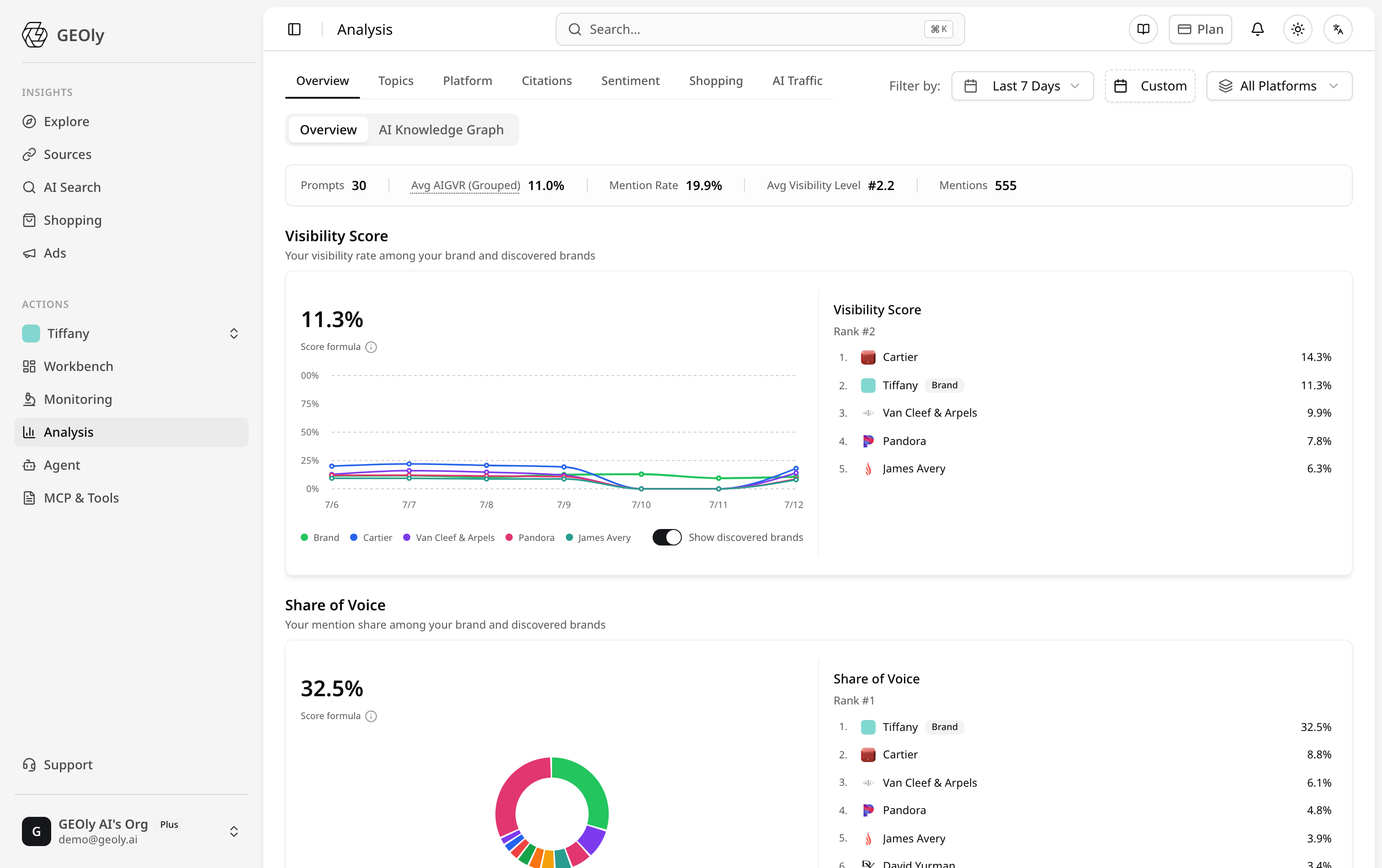

Proof, not proxy
Connect GA4 (read-only OAuth) and Cloudflare to measure real AI referral sessions, purchase conversion rates, AI Conversions, and AI Revenue per engine.
Governance built in
Org-level workspaces with brands as projects, team seats and roles, agency binding, and plan-level platform entitlements.
Reporting that runs itself
Agent-generated reports—GEO diagnostic, competitor comparison, optimization plan—export to boardroom-ready PDF, with bilingual output verified figure by figure.
Enterprise-adjacent paths
Most enterprise rollouts combine the portfolio standard with a commerce play and a partner program.
GEOly capabilities behind this enterprise path
Enterprise brand teams need a combination of monitoring, governance, competitive intelligence, and systems connectivity rather than one isolated feature.
Brand Visibility Tracking
Track inclusion, placement, and movement by brand, market, and prompt cluster.
ExploreCompetitor Analysis
See which competitors keep winning answer share in different markets and categories.
ExploreIndustry Intelligence
Help headquarters understand topic migration, source patterns, and market-by-market shifts.
ExploreIntegrations
Connect BI, collaboration, knowledge, and execution systems so GEO data fits into enterprise workflows.
ExploreFrequently asked questions about this solution
Turn multi-brand, multi-market AI visibility into an enterprise operating layer
If the problem has moved beyond “is one brand visible?” to “how does the organization manage this continuously?”, the next step is not more spreadsheets. It is a governed workspace and integration model the whole enterprise can actually run on.